


 Editor's Desk





Truecaller has a feature that can identify unknown WhatsApp callers on your phone. You can use it to identify who’s calling you on your WhatsApp number.
Caller ID for WhatsApp Number – How do I activate it?
To activate the Caller ID for WhatsApp, you need to use the latest version of the Truecaller app.
1. Download & install the Truecaller app on your Android phone.
2. Complete the account creation process.
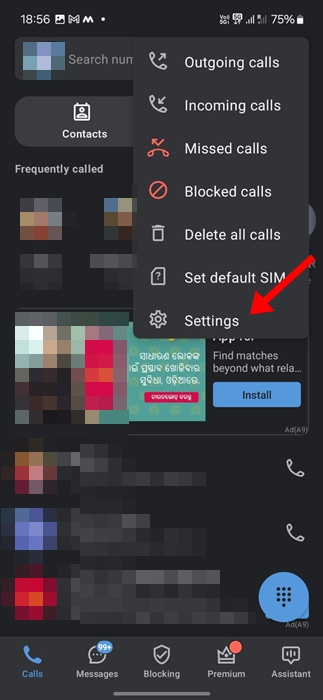
3. Tap the three dots at the top right of the screen.
4. Select Settings.
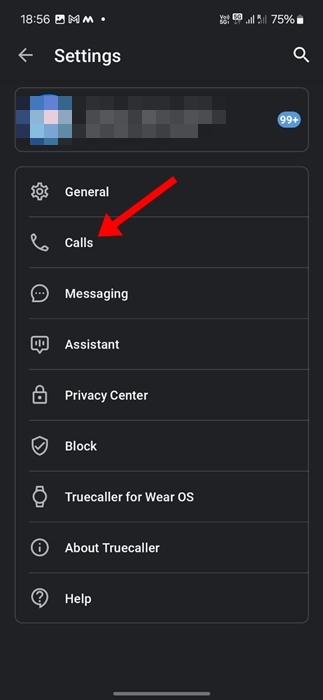
5. Select Calls.
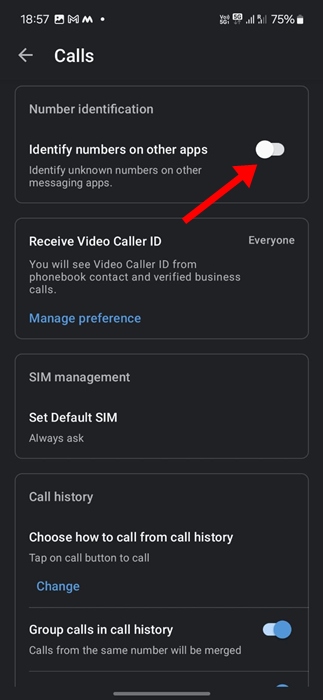
6. On Calls, scroll down and enable the toggle for ‘Identify numbers on other apps’.
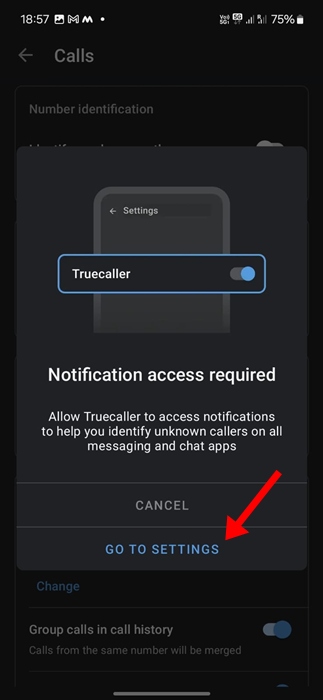
7. Truecaller will ask you to grant notification permission. Grant the permissions that it asks for.
8. Scroll down and enable the Show calls from other apps option.
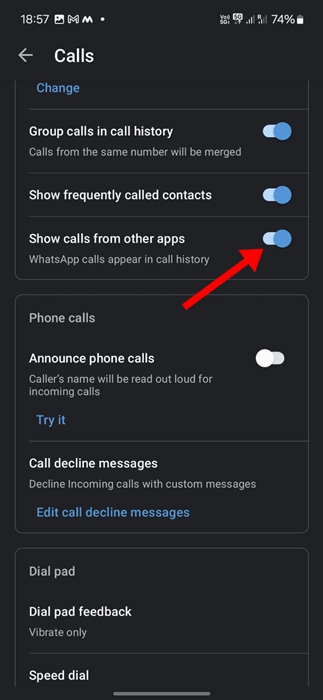
Once you activate the feature, the TrueCaller caller identification for WhatsApp calls will happen on incoming calls from unknown numbers.
Frequently Asked Questions:
Caller ID for WhatsApp – Will it work with all calls?
The caller identification feature for WhatsApp calls will only be available for incoming calls from unknown numbers. It won’t show a caller ID if the number that’s calling you is in your contact book.
Can you have a Caller ID for WhatsApp on your iPhone?
On iPhone, Truecaller’s caller identification feature works out of the box. To identify unknown callers on WhatsApp, you just need to enable the Live Caller ID feature.
Is there any other app that can identify unknown callers on WhatsApp?
Other caller identification apps exist, but they can’t identify calls that you receive on WhatsApp. Only a few caller ID apps, like TrueCaller, do this.
Can TrueCaller block unknown callers on WhatsApp?
TrueCaller can only identify unknown callers on WhatsApp; it can’t block them. To block those callers, you need to manually add the numbers to WhatsApp’s block list.
This guide explains how to identify unknown callers on WhatsApp with the TrueCaller app. If you need more help with this topic, let us know in the comments. Also, if you find this guide helpful, don’t forget to share it with your friends.
The post Caller ID for WhatsApp – How to Identify Unknown Calls appeared first on TechViral.

News reported through various sources and compiled with AI. This is automatically generated news content from known, popular, and reliable sources available at the time of publication.
We do not take any responsibility for, nor make any representations regarding, the accuracy, completeness, credibility, or
reliability of the content.
In case of any discrepancy, error, or copyright claim, we will promptly review and remove the content in question where appropriate.
We do not claim ownership of third-party content and assume no responsibility or liability whatsoever for any information contained herein. The credit, links and images are kept intact as an honest gesture, are property of its respective owners.