

 Editor's Desk





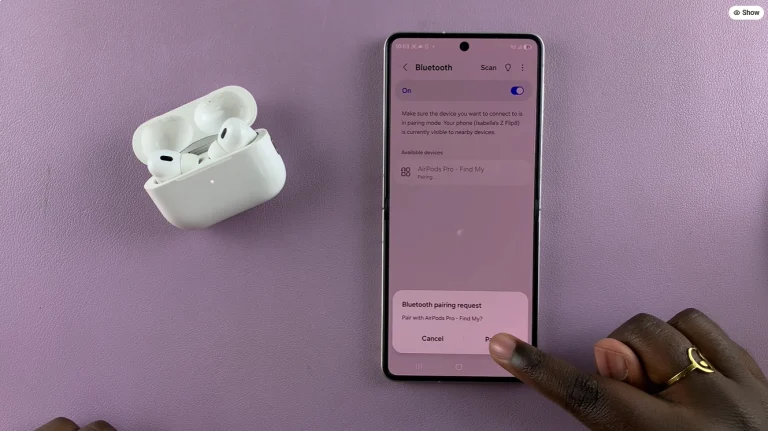
In this article, you’ll learn how to connect AirPods to Samsung phone using Bluetooth. Connecting AirPods to a Samsung phone lets you listen to music, watch videos and make calls wirelessly.
AirPods work with Samsung Galaxy phones through Bluetooth, so you can pair them just like other wireless earbuds. Before you begin, make sure your AirPods have enough charge and keep them close to your Samsung phone.
Once you pair your AirPods, your Samsung phone can remember the connection and reconnect to them when they are available. Follow the steps below to pair AirPods to your Samsung device.
Read: How To Change Voice Recording Quality On Samsung Galaxy S26 Ultra
Connect AirPods To Samsung Phone
Open the Settings app on your Samsung phone. Then, tap Connections to access the wireless connection options on your device. Tap Bluetooth and turn it on if it is currently disabled. Keep the Bluetooth settings page open while you prepare your AirPods for pairing.
Place your AirPods inside the charging case and open the lid. Press and hold the setup button on the back of the AirPods case until the status light starts flashing. This puts the AirPods into pairing mode.

Now, look under Available devices on your Samsung phone. Find your AirPods in the list and tap their name to begin the pairing process. Finally, tap Pair if your Samsung phone asks you to confirm the connection. Your AirPods will then connect to the Samsung phone, allowing you to use them for audio and calls.

Watch: iPhone Duo – Everything You Need To Know
The post How To Connect AirPods To Samsung Phone appeared first on WebPro Education.

News reported through various sources and compiled with AI. This is automatically generated news content from known, popular, and reliable sources available at the time of publication.
We do not take any responsibility for, nor make any representations regarding, the accuracy, completeness, credibility, or
reliability of the content.
In case of any discrepancy, error, or copyright claim, we will promptly review and remove the content in question where appropriate.
We do not claim ownership of third-party content and assume no responsibility or liability whatsoever for any information contained herein. The credit, links and images are kept intact as an honest gesture, are property of its respective owners.